How to write product image alt text (and fix it in bulk on Shopify)
Alt text is the sentence a screen reader reads in place of an image. Without it, a blind shopper has no idea what your product looks like.
In our test of 20 EU storefronts, 16 had images without alt text. It maps to WCAG 2.1 success criterion 1.1.1 Non-text Content, a Level A requirement, and it is one of the issues US ADA complaints cite most. It is also one of the easiest to fix: no redesign, just the right words on each image.
What alt text does
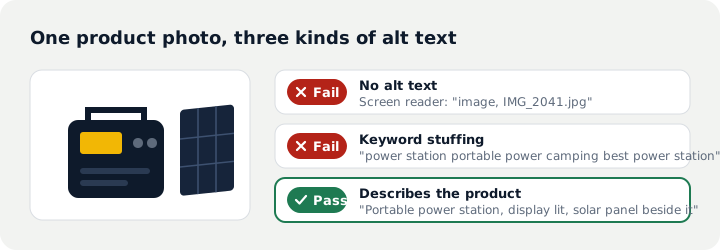
When a screen reader reaches an image it reads the alt text. With none, some screen readers read the file name ("IMG_2041.jpg") and others skip the image. For a store that sells with photos, those products simply do not exist for these shoppers.
Decide what the image needs
W3C publishes an alt decision tree. For a store it boils down to four questions:
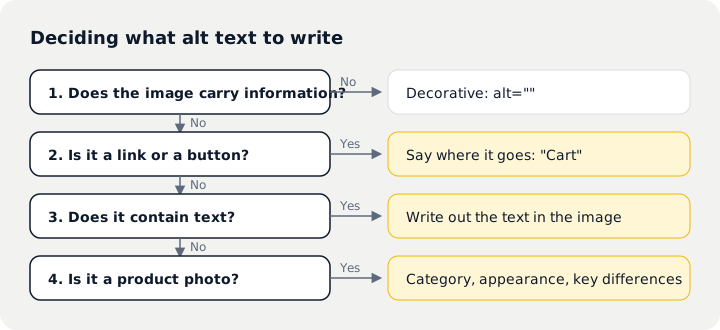
- Decorative images such as textures, dividers or icons that repeat nearby text get an empty alt (alt=""), so screen readers skip them. Empty, not missing.
- Images used as links or buttons describe the action: "Cart", "Search", "Home". Not "cart icon".
- Banners with text repeat the text: "Black Friday, 20% off everything, ends 28 November".
- Product photos describe the product, as below.
Describing product photos
Category, appearance, angle or setting, and what sets this image apart from the others, in one or two sentences:
| Image | Weak | Better |
|---|---|---|
| Main photo | Power station | Portable power station, front view, dark grey case, display lit |
| Detail | Detail | Side ports on the power station: two USB-C and one car socket |
| Lifestyle | camping power station portable | Power station on a folding table beside a tent, powering a lamp |
| Colour variant | Image 2 | The same power station in off-white |
Common mistakes:
- Starting with "image of" or "photo of". The screen reader already says "image".
- Stuffing keywords. People hear every word, and search engines do not reward it.
- Repeating the product title on every image, so shoppers cannot tell main, detail and lifestyle shots apart.
- Subjective copy such as "stunning power station".
Editing alt text in Shopify
One image at a time: open the product in the admin, click an image and fill in the alt text field. Then check the storefront to make sure your theme actually outputs that field; some third-party themes and page builders use their own image fields.
For large catalogues, use the product CSV:
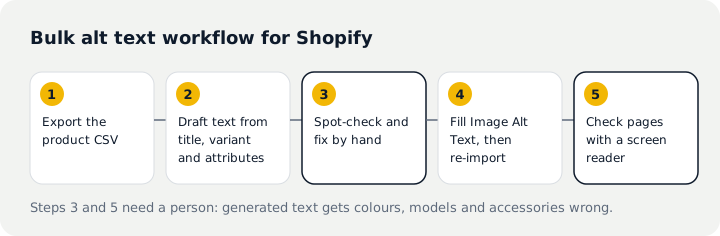
- Export all products and keep an untouched copy as a backup.
- Each image is a row, and the description goes in the Image Alt Text column. Draft descriptions from the title, variant (colour, size) and image position; AI can help with the draft.
- Spot-check by hand. At minimum review each product's main image and fix wrong colours, models or accessories.
- Fill the Image Alt Text column and import with the option to overwrite products with matching handles.
- Check a few product pages on the storefront with a screen reader or our test tool.
Import overwrites every field present in the CSV. Change only the Image Alt Text column and leave the rest exactly as exported, so prices and inventory are not touched.
Checking the result
Run our free accessibility test on your home, product and collection pages; the missing alt text item should be gone. Then turn on VoiceOver (iPhone) or TalkBack (Android) and listen to a product page to make sure it makes sense. The rest of the checks are in the WCAG 2.1 AA checklist.
Questions
How long should alt text be?
WCAG sets no length. For product photos one or two sentences usually covers category, appearance and what makes this image different; detailed specs belong in the product description.
Do multilingual stores need alt text in every language?
Yes. Alt text should match the page language, otherwise screen readers pronounce it wrongly.
Can we publish AI-generated alt text as is?
Use it as a draft. Generated descriptions often get colours, models and accessories wrong, so check every product's main image at least.
Sources
- W3C: Web Content Accessibility Guidelines (WCAG) 2.1
- W3C WAI: An alt Decision Tree
- TestParty: How to Add Alt Text to All Shopify Products (Bulk Guide)
This article summarises technical requirements and public data. It is not legal advice; for legal obligations and lawsuits, consult a qualified attorney.