A 10-minute keyboard test: can someone buy from your store without a mouse?
Automated tools struggle to tell whether a shopper can complete a purchase with a keyboard alone. The fastest way to find out is to try it, and it takes about ten minutes.
People with limited hand movement and blind people using screen readers both rely on the keyboard. The relevant WCAG 2.1 criteria are basic: everything works from a keyboard (2.1.1), focus never gets trapped (2.1.2), focus order makes sense (2.4.3) and focus is visible (2.4.7). The first three are Level A and the last is AA. Our online test presses Tab 30 times automatically, but a full shopping journey needs a person.
Before you start
- Mac: in System Settings → Keyboard, turn on Keyboard navigation. In Safari, also tick "Press Tab to highlight each item on a webpage" under Settings → Advanced, or Tab skips links. Chrome is simpler.
- Windows: Chrome and Edge support Tab navigation out of the box.
- Push the mouse or trackpad aside and do not touch it.
- Keep notes: page, step, problem, and a screenshot where you can.
The route
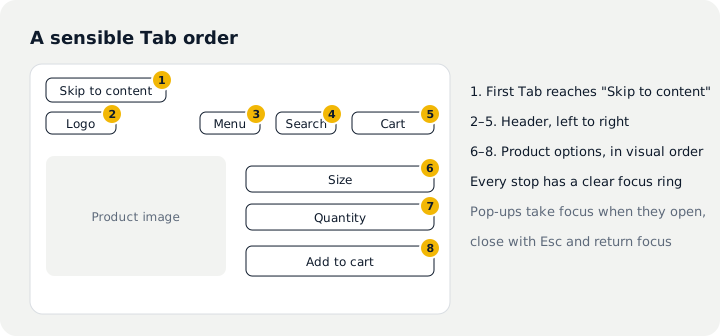
- First Tab on the home page should reveal a "Skip to content" link that jumps past the header.
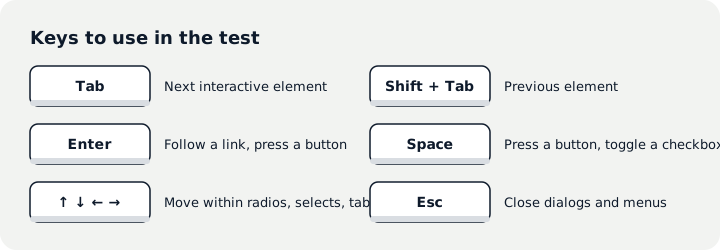
- Navigation: dropdowns open with Enter or arrows and close with Esc.
- Pop-ups: newsletter and cookie banners should take focus, close with Esc or a close button, and return focus where it was.
- Search: reach the field with Tab, type, press Enter.
- Collection page: filters, sorting and load more all work.
- Product page: pick a colour and size, change quantity, add to cart, with feedback at each step.
- Cart: change quantity, remove an item, enter a discount code.
- Checkout: reaching the address step is enough. No need to place an order.
What to look for
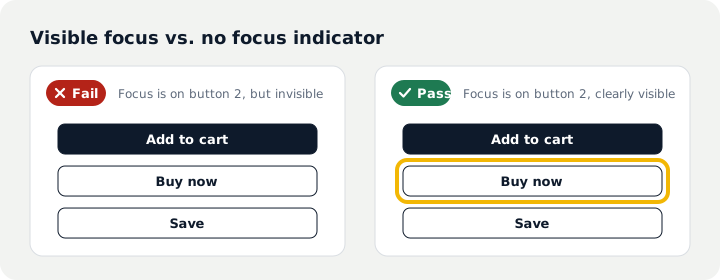
First, the focus indicator. Every Tab press should show a clear outline or highlight. Many themes remove it for looks, leaving keyboard users lost:
Second, the order. Focus should follow the visual order: header, then content, product options top to bottom. Jumping to the footer or stopping on invisible elements is a problem:
Third, traps. If focus enters a carousel, video or chat widget and cannot leave, that is a Level A failure. WCAG 2.2 adds that focus must not be completely hidden by sticky headers or cookie banners.
Common problems and fixes
| Problem | Usual cause | Fix |
|---|---|---|
| No visible focus | outline: none in the CSS | Add a clear outline or background for :focus-visible |
| Button does nothing | A div or span used as a button | Use a real button element, or add keyboard handling and a role |
| Pop-up will not close | The dialog does not manage focus | Move focus in on open, close on Esc, return focus to the trigger |
| Focus on hidden things | Hidden menus or carousel slides stay focusable | Make hidden content unfocusable too |
| Focus jumps around | Positive tabindex values | Remove positive tabindex and follow DOM order |
Most of these live in the theme and third-party apps, so one fix applies site-wide. Walk the route again afterwards and tick off your notes. More checks are in the WCAG 2.1 AA checklist, and the free test shows the automated keyboard results.
Questions
What if checkout is where it breaks?
Shopify maintains its checkout, so problems usually come from checkout extensions or third-party apps you added. Disable suspects and test again to find the source.
Is passing the keyboard test enough?
No. Keyboard access is the baseline; screen reader output and colour contrast need their own checks.
Should we test keyboards on mobile?
On phones, test zoom and screen readers (VoiceOver, TalkBack). Do the keyboard test on a computer.
Sources
- W3C: Web Content Accessibility Guidelines (WCAG) 2.1
- W3C: Web Content Accessibility Guidelines (WCAG) 2.2
- The A11Y Project: Browser keyboard navigation in macOS
This article summarises technical requirements and public data. It is not legal advice; for legal obligations and lawsuits, consult a qualified attorney.